# Fleshy Leaf CPU+GPU Cooling Fan Replacement for Acer Nitro 5 AN515-58 DC12V | 2 Fans for Enhanced Laptop Cooling

**Brand:** Fleshy Leaf
**SKU:** mcs7616
**ASIN:** B0BKZYC65L
**Canonical URL:** https://crowcrowcrow.com/p/fleshy-leaf-cpu-gpu-cooling-fan-replacement-acer-nitro-an515-58-dc12v/mcs7616
**Category:** electronics
**Subcategory:** Categories
**Availability:** in_stock
**Price (INR, all-inclusive):** ₹3,265
**Discount:** 35%
**Customer rating:** 4.30/5 from 31 ratings

## Description

Fleshy Leaf CPU+GPU cooling fan replacement set for Acer Nitro 5 AN515-58 laptops. Includes 1 CPU fan and 1 GPU fan, DC 12V. Restore optimal thermal performance and ensure smooth operation under load. Imported from USA, all duties included.

## Highlights

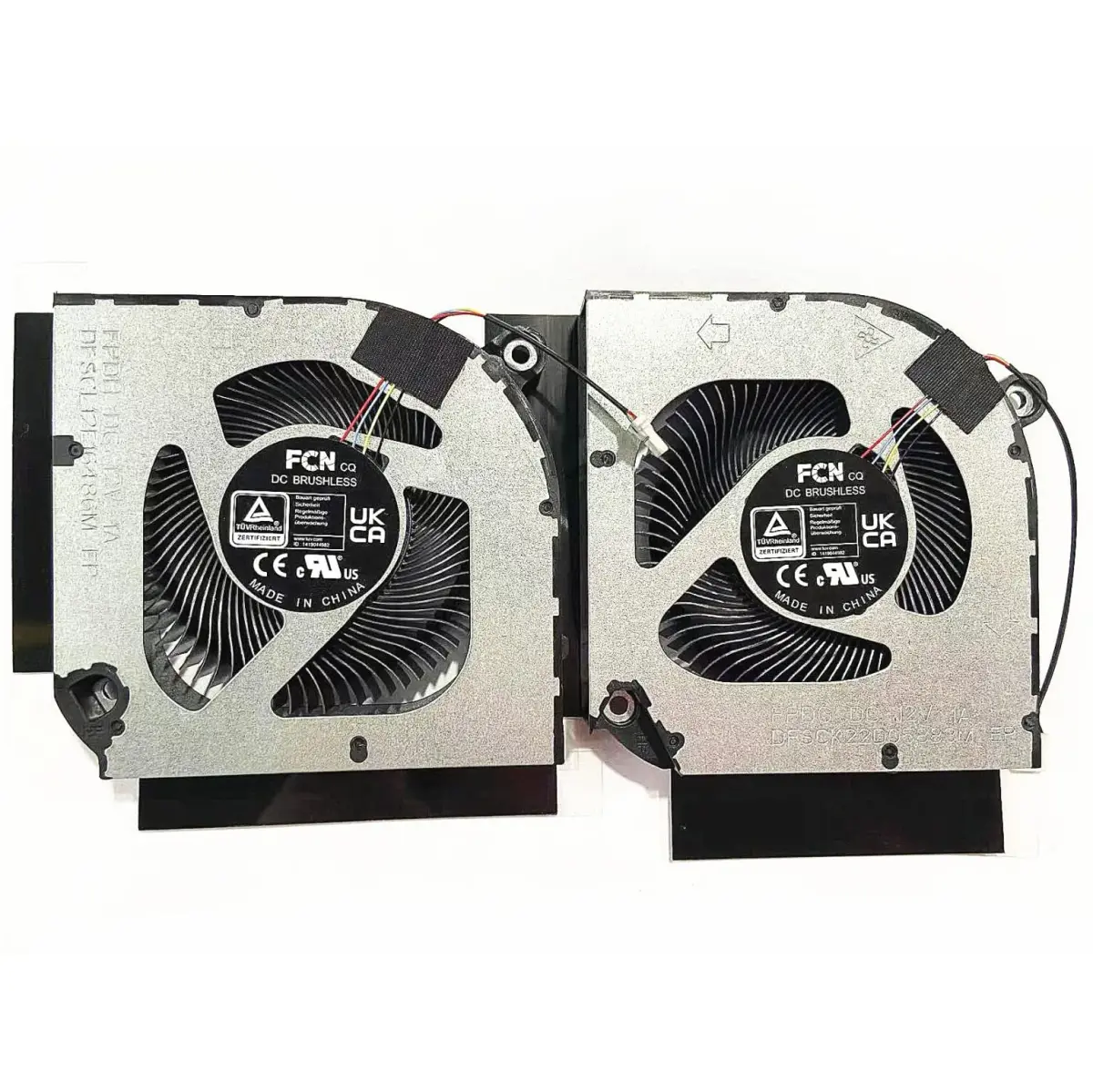
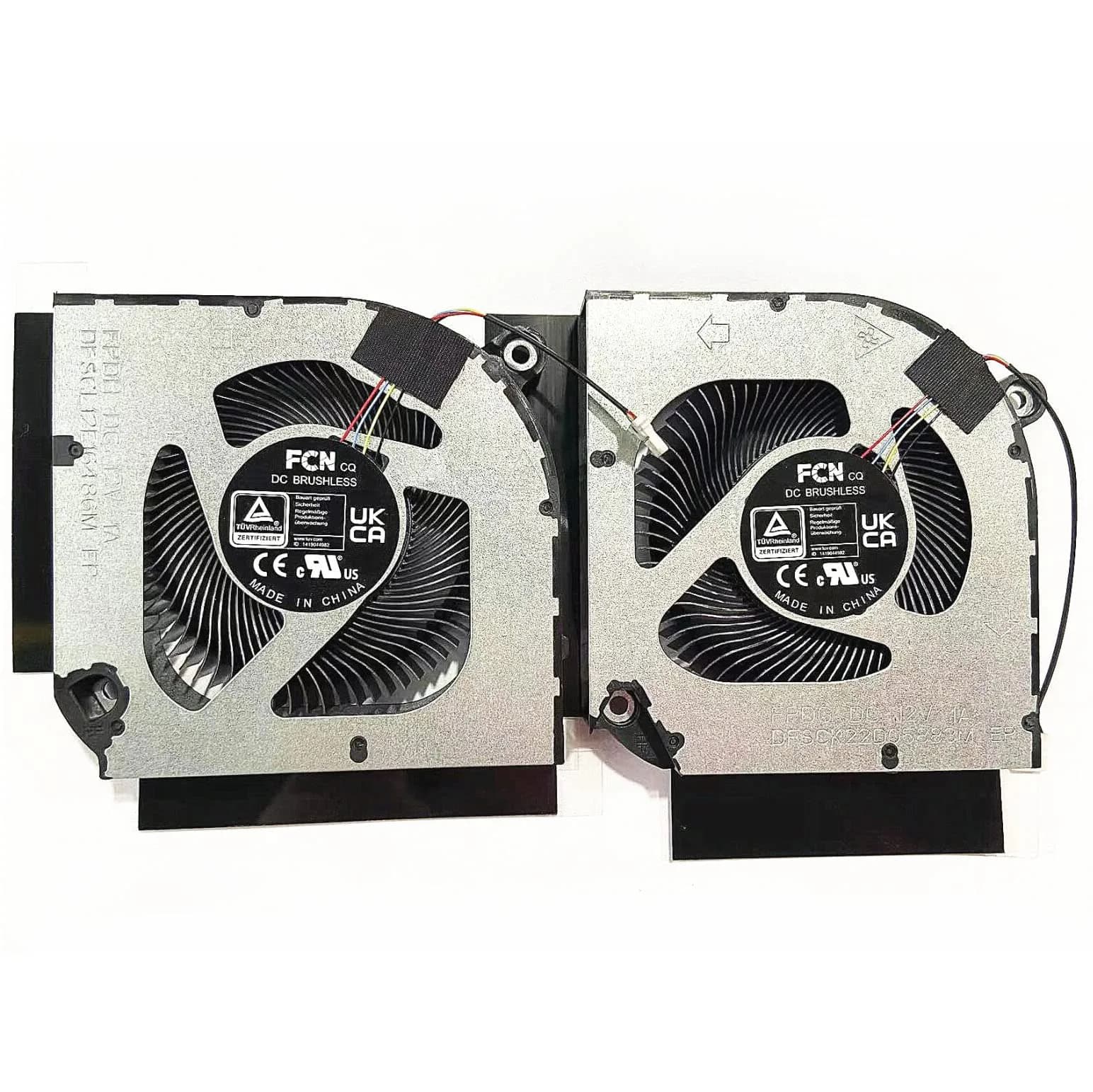
- Direct Replacement Fit — Engineered as a direct replacement for Acer Nitro 5 AN515-58, AN517-55, AN515-46, N22C1, PH317-55, PH315-55, PH317-56 models. Verify part numbers DFSCK22D05883M FPDG and DFSCL12E16486M FPDH against your original fans for guaranteed compatibility.
- Dual Fan Cooling — Includes one CPU fan and one GPU fan to ensure comprehensive cooling for your laptop's critical components. This dual-fan setup helps maintain optimal temperatures during intensive tasks like gaming or video editing.
- Standard 12V DC Operation — Operates on a standard 12V DC power connector, compatible with your laptop's motherboard fan headers. This ensures easy installation and reliable power delivery for consistent cooling performance.
- Restores Thermal Performance — Replaces worn or faulty fans to prevent overheating, reduce system noise, and maintain peak performance. Essential for extending the lifespan of your Acer Nitro 5 laptop and avoiding thermal throttling.

## Key features

- Note:If you are not sure,please confirm the part number and picture you need before purchasing. thank you!!!
- Package include: 1 x CPU Fan+GPU Fan
- Compatible model: for Acer Nitro 5 AN515-58 AN517-55 AN515-46 N22C1 PH317-55 PH315-55 PH317-56
- P/N:DFSCK22D05883M FPDG DFSCL12E16486M FPDH
- Please check the confirmation picture and part number before purchasing. If you have any questions, please feel free to contact us and we will help you. Thank you very much!!

## Why choose this product

- Restore Your Laptop's Cooling Power — Your Acer Nitro 5's performance hinges on effective cooling. When CPU or GPU fans fail, your laptop overheats, leading to slowdowns and potential damage. This Fleshy Leaf replacement set provides the exact components needed to restore optimal thermal management. Imported from authorized US retailers, these fans ensure you receive a quality part designed for your specific model. Unlike local alternatives that may offer generic compatibility, these fans are precision-engineered for your Acer Nitro 5, ensuring a perfect fit and reliable operation. Get back to smooth gaming and multitasking without worrying about heat.
- Who It's For vs. Who Should Skip It — This fan set is ideal for Acer Nitro 5 AN515-58, AN517-55, AN515-46, N22C1, PH317-55, PH315-55, PH317-56 laptop owners experiencing overheating, fan noise, or system shutdowns due to faulty cooling fans. If your laptop's original fans are visibly damaged, making unusual noises, or not spinning, this is the solution. Skip this product if you own a different Acer model or a laptop from another brand, as compatibility is specific. Always double-check your laptop's internal fan part numbers and appearance against the product images and listed compatible models before purchasing.

## How to use

1. Before proceeding, carefully open your Acer Nitro 5 laptop. Identify the original CPU and GPU fan part numbers and compare them visually with the Fleshy Leaf product details and images to ensure an exact match. — Verify Compatibility
2. Gently disconnect the power cables of the old fans from the motherboard. Unscrew the fans from their mounting points and carefully remove them from the laptop chassis. — Disconnect and Remove Old Fans
3. Position the new Fleshy Leaf CPU and GPU fans in their respective mounting locations. Secure them with screws and reconnect their power cables to the correct motherboard headers. — Install New Fleshy Leaf Fans
4. Carefully reassemble your laptop. Power it on and monitor temperatures using system software to confirm the new fans are operating correctly and effectively cooling the CPU and GPU. — Reassemble and Test

## Product details

| Field | Value |
|---|---|
| Installation | Requires opening laptop; verify compatibility before installation. Professional installation recommended if unsure. |
| Lifespan | Expected lifespan varies with usage; replacement recommended when original fans show signs of wear or failure. |
| Compatibility Check | Crucial to match part numbers and visual appearance with original fans before purchase. |
| Brand | Fleshy Leaf |
| Compatible Models | Acer Nitro 5 AN515-58, AN517-55, AN515-46, N22C1, PH317-55, PH315-55, PH317-56 |
| Part Numbers | DFSCK22D05883M FPDG, DFSCL12E16486M FPDH |
| Voltage | DC 12V |
| Material | Plastic, Metal |
| Cooling Method | Air |
| Number of Fans | 2 (1 CPU, 1 GPU) |
| Maximum Rotational Speed | 2000 rpm |
| Power Connector Type | 2-Pin or 3-Pin |
| Item Package Weight | 0.118 kg (0.26 lb) |
| Item Package Dimensions | 3.4 cm (1.34 in) x 9.9 cm (3.9 in) x 12.7 cm (5 in) |
| Country of Origin | Not stated by manufacturer — US retail version, sourced from authorized US retailers |

## Frequently asked questions

### How do I know if I need to replace my Acer Nitro 5 laptop fans?

You likely need new fans if your Acer Nitro 5 laptop is overheating, shutting down unexpectedly during use, or if you hear loud, grinding, or rattling noises from the cooling fans. Reduced fan speed or complete fan failure, confirmed by diagnostic tools or visual inspection, also indicates a need for replacement.

### Will these Fleshy Leaf fans fit my Acer Nitro 5 AN515-58?

Yes, these Fleshy Leaf fans are designed as direct replacements for the Acer Nitro 5 AN515-58, AN517-55, AN515-46, N22C1, PH317-55, PH315-55, and PH317-56 models. Always confirm your laptop's specific fan part numbers (e.g., DFSCK22D05883M FPDG, DFSCL12E16486M FPDH) and visual appearance match the product details before purchasing.

### What is the voltage and connector type for these laptop fans?

These Fleshy Leaf cooling fans operate on a standard DC 12V power supply. The connector type is typically 2-pin or 3-pin, designed to interface with your laptop's motherboard fan headers. Ensure this matches your original fan connectors for proper installation and function.

### How to choose the right CPU GPU fan for my laptop?

To choose the right fan, first identify your laptop's exact model number and search for its specific CPU and GPU fan part numbers. Compare these numbers and the physical appearance of your original fans with the product listing details. Ensure the voltage and connector type match your motherboard's requirements for a successful replacement.

### Can I use these fans for other laptop models?

These Fleshy Leaf fans are specifically designed and tested for the Acer Nitro 5 AN515-58 series and compatible models listed. Using them in other laptop models is not recommended as fan size, mounting points, and connectors can vary significantly, potentially causing damage or improper fit.

### What are the benefits of replacing old laptop fans?

Replacing old, worn-out laptop fans significantly improves cooling efficiency, preventing overheating and performance throttling. This leads to a quieter system, as worn fans often become noisy. It also extends the lifespan of your laptop's components by maintaining optimal operating temperatures, reducing the risk of heat-related damage.

### How to install a new laptop cooling fan?

Installation typically involves carefully opening your laptop's chassis, disconnecting the old fan, unscrewing it, and then installing the new fan in its place. Reconnect the new fan's power cable to the motherboard header and reassemble the laptop. If you are unsure, it is best to consult a professional technician.

### Are these fans compatible with Indian voltage standards?

Yes, these fans operate on DC 12V, which is standard for laptop internal components and universally compatible regardless of regional AC voltage. The power is drawn directly from the laptop's motherboard, not an external adapter, making them region-agnostic for operation.

## Compliance

No product-specific compliance warnings identified. Standard imported-goods terms apply: customs duties & GST paid; for personal use in India; follow the manufacturer's usage instructions on the packaging.

## Images

1. https://images.crowcrowcrow.com/B0BKZYC65L-2.webp
2. https://images.crowcrowcrow.com/B0BKZYC65L-5.webp
3. https://images.crowcrowcrow.com/B0BKZYC65L-8.webp
4. https://images.crowcrowcrow.com/B0BKZYC65L-11.webp
5. https://images.crowcrowcrow.com/B0BKZYC65L-14.webp
6. https://images.crowcrowcrow.com/B0BKZYC65L-17.webp

---

Source: https://crowcrowcrow.com/p/fleshy-leaf-cpu-gpu-cooling-fan-replacement-acer-nitro-an515-58-dc12v/mcs7616

Returns: 30 days, free, by mail. Shipping: Free across India, 7–13 business days. Prices are all-inclusive (duties + GST).