# VSDISPLAY Controller Board for 15.6" 1366x768 LCD Screens | VGA DVI Audio Input

**Brand:** VSDISPLAY
**SKU:** rgr6208
**ASIN:** B06X9SYFGM
**Canonical URL:** https://crowcrowcrow.com/p/vsdisplay-vga-dvi-lvds-controller-board-40pin-15-6-1366x768-lp156wh2-lp156wh3-lp156wh4/rgr6208
**Category:** electronics
**Subcategory:** Categories
**Availability:** in_stock
**Price (INR, all-inclusive):** ₹3,618
**Discount:** 6%
**Customer rating:** 4.40/5 from 211 ratings

## Description

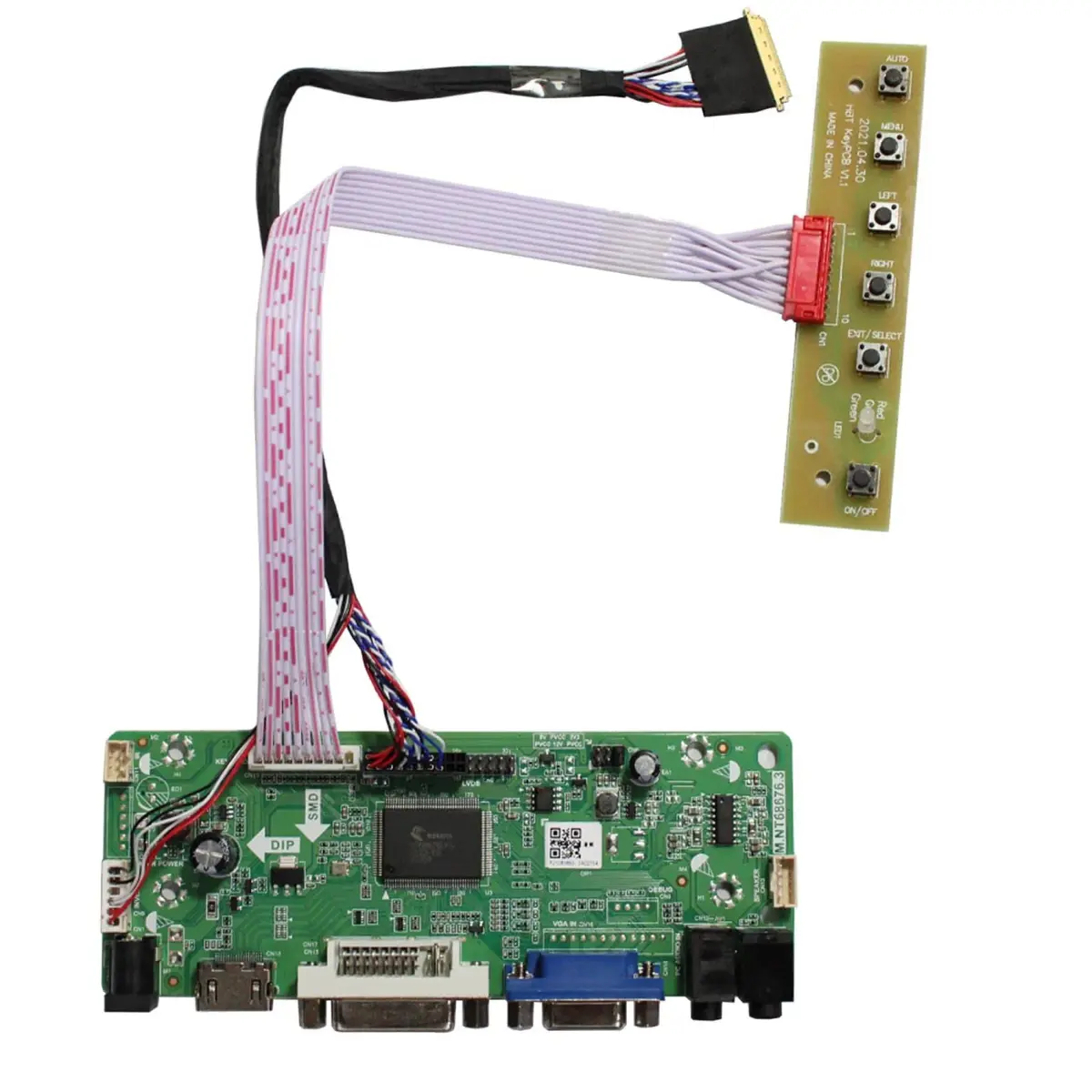
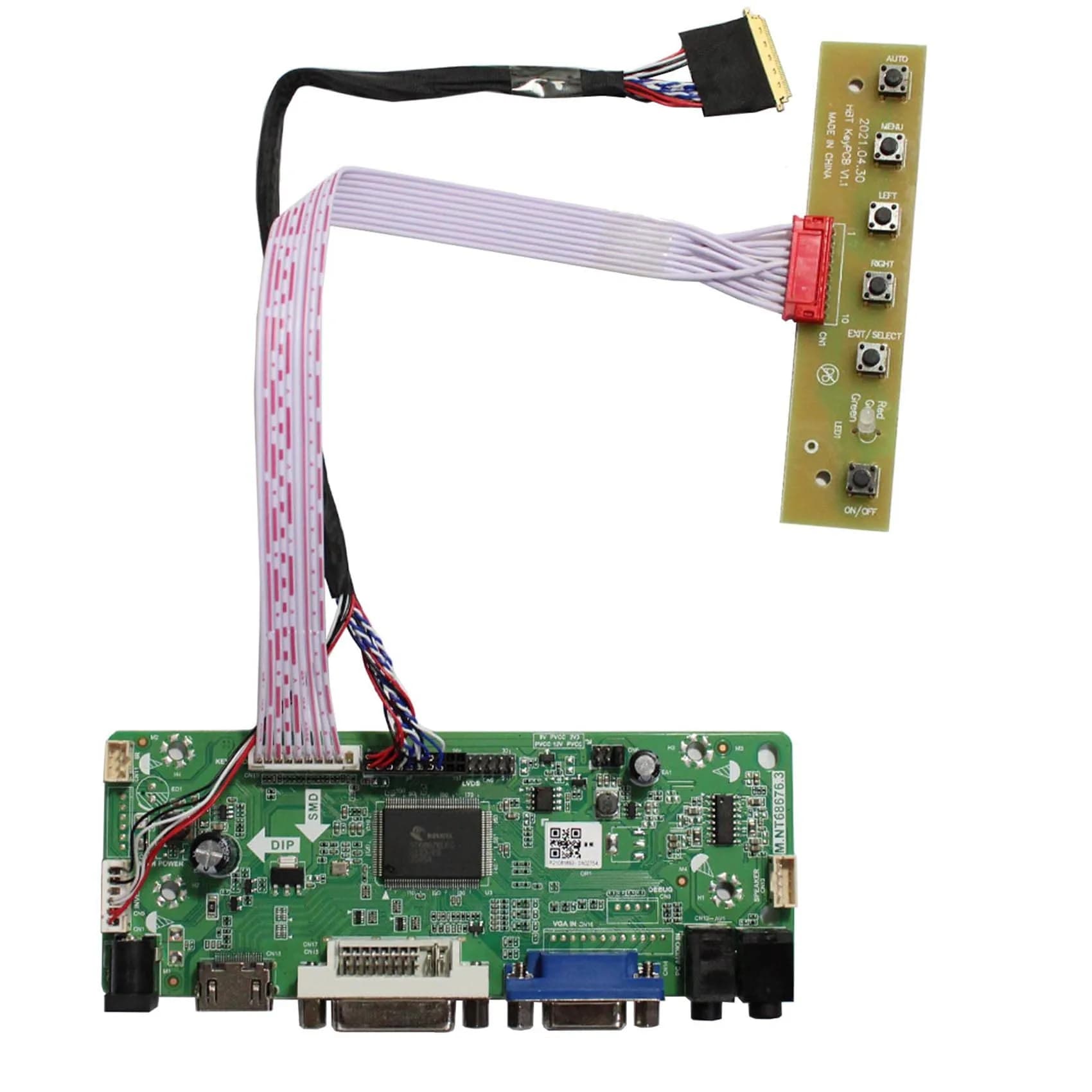
VSDISPLAY controller board kit transforms a 15.6" 1366x768 LCD panel into a monitor with VGA, DVI, and audio. Includes board, LVDS cable, and keyboard. Requires 12V DC power adapter. Ideal for DIY projects or laptop screen repairs, arriving via ExpressBox tracked delivery within {{ccc_delivery_eta}}.

## Highlights

- Wide Panel Compatibility — Works with numerous 15.6-inch 1366x768 LCD panels including LP156WH2, LP156WH3, and N156B6, ensuring broad application for DIY projects or screen replacements.
- Versatile Input Options — Supports VGA, DVI, and audio inputs, allowing connection to various devices. Requires a 12V DC power adapter (not included) for operation.
- Plug-and-Play Setup — Connects directly to compatible screens via the included 40-pin LVDS cable. Power on and select your input source for immediate display functionality.
- DIY Monitor Solution — Ideal for repurposing old laptop screens or building custom monitors. Includes controller board, LVDS cable, and wired keyboard for a complete setup.

## Key features

- Work for 15.6 inch 1366x768 40 pin WLED LVDs LCD display ,the screen model no. are: 15.6 inch LP156WH2 TL LP156WH3 TL LP156WH4 TL LP156WHB TL BT156GW02 N156B6 B156XTN03 B156XW02 B156XW04.
- Video input: VGA DVI ,Audio Output: Speaker Connector （8ohm 2W 4Pin PH2.0 connection),Please use the board in insulated environment.
- Input Power : 12V DC more than 2A ,port size :5.5x2.1mm, pls prepare power adapter by yourself.If screen restart again and again ,pls change a larger current power supply and try again.
- Plug & play: with compatible screen , connect screen signal port as link pictures ,Power on ,enter into H/D/VGA/DVI signal cable ,the screen can be lit up .
- Board failure self-check: Directly power on board ,The LED light green/red means board can work normally ;Then connect screen signal port, No enter signal ,the"no siganl" words showing on screen means the problem comes from signal ,Pls try with other signal cable /resource; White/Black screen ,Check screen signal port connecting/resolution/3.3V jumper pin/Signal resource.

## Why choose this product

- This VSDISPLAY controller board kit empowers you to repurpose a 15.6-inch 1366x768 LCD panel into a functional monitor. It bridges the gap between a raw screen and a usable display with VGA, DVI, and audio inputs. The kit includes essential components like the controller board, LVDS cable, and a wired keyboard, simplifying your DIY project. It's a practical choice for extending the life of existing components or creating custom display solutions. — Transform Your Display
- This kit is perfect for tech enthusiasts, hobbyists, and individuals looking to build custom monitors or salvage laptop screens. If you have a compatible 15.6-inch 1366x768 LCD panel and a 12V DC power adapter, this kit offers a straightforward solution. However, if you require a monitor with higher resolution (e.g., Full HD), different input ports like HDMI, or a built-in power supply, this specific kit may not be suitable. Ensure your panel model is listed for compatibility before purchasing. — Who It's For vs. Who Should Skip

## How to use

1. Verify your LCD panel is 15.6-inch with 1366x768 resolution and a 40-pin LVDS connector. Check the panel model number against the list provided in the product description to ensure it's supported by this controller board. — Confirm Panel Compatibility
2. Carefully connect the 40-pin LVDS cable from the LCD panel to the controller board. Attach the wired keyboard to its designated port on the board. Ensure all connections are secure and the board is placed on an insulated surface. — Connect Components
3. Plug your 12V DC power adapter (minimum 2A, 5.5x2.1mm connector) into the board. Connect your video source (VGA or DVI cable) and any audio source to the respective ports on the controller board. — Connect Power and Video
4. Turn on the power adapter. The board's LED should indicate normal operation. Use the buttons on the board or your connected keyboard to select the input source (VGA, DVI, or Audio) to display your content on the screen. — Power On and Select Input

## Product details

| Field | Value |
|---|---|
| Compatible LCD Models | LP156WH2, LP156WH3, LP156WH4, TL, BT156GW02, N156B6, B156XTN03, B156XW02, B156XW04 |
| Video Input | VGA, DVI |
| Audio Output | Speaker Connector (8ohm 2W 4Pin PH2.0) |
| Power Supply Requirement | 12V DC, 2A minimum (adapter not included) |
| Cost per use | N/A (Durable component) |
| Shelf life after opening | N/A (Durable component) |
| Reapplication math | N/A (Durable component) |
| Contraindications | Requires compatible LCD panel and 12V DC power adapter. Not for use with higher resolution panels or different input types without modification. |
| Allergens / common irritants | N/A |
| Brand | VSDISPLAY |
| Display Size | 15.6 inches |
| Resolution | 1366 x 768 (HD) |
| Display Technology | LCD, LED |
| Aspect Ratio | 16:9 |
| Screen Surface | Glossy |
| Connectivity Technology | DVI, HDMI, VGA |
| Input Power | 12V DC, 2A minimum recommended |
| Package Content | Controller Board, 40-Pin LVDS Cable, Wired Keyboard |
| Country of Origin | Not stated by manufacturer — US retail version, sourced from authorized US retailers |

## Frequently asked questions

### How do I know this replacement part fits my laptop?

To ensure compatibility, match the part to your laptop's exact model number and the original part number printed on the component you are replacing. For this controller board kit, confirm your LCD panel is 15.6-inch with a 1366x768 resolution and a 40-pin LVDS connector. Verify your panel model number against the list provided in the product description.

### Is this an OEM part or aftermarket?

This VSDISPLAY controller board kit is an aftermarket-compatible replacement designed to function with specific LCD panel models. It is built to the original component's specifications for physical and electrical compatibility. Ensure your LCD panel model is listed for compatibility before purchase.

### What is the best monitor for India?

The 'best' monitor for India depends on your needs, but for DIY projects, this VSDISPLAY controller board kit allows you to build a functional 15.6-inch HD monitor using a compatible LCD panel. It offers VGA, DVI, and audio inputs, suitable for general use. For higher resolutions or specific features, consider dedicated monitor models.

### How to use VSDISPLAY controller board?

Connect the 40-pin LVDS cable from your compatible 15.6-inch 1366x768 LCD panel to the controller board. Connect your video source (VGA or DVI) and audio source. Power the board with a 12V DC adapter (minimum 2A). Once powered, select your input signal. The board features a self-check LED and plug-and-play functionality.

### Can I use this controller board with a 220V power supply?

This controller board itself operates on 12V DC. You will need a 12V DC power adapter with at least 2A current. Ensure the adapter you use is compatible with Indian voltage standards (220-240V) and has the correct connector size (5.5x2.1mm). The board itself does not directly connect to a wall outlet.

### What are the benefits of using a controller board kit?

Using a controller board kit like this VSDISPLAY model allows you to repurpose an old laptop screen into a standalone monitor. It provides essential input ports (VGA, DVI, Audio) and a simple setup process. This is beneficial for DIY enthusiasts, repair projects, or creating custom display solutions, potentially saving costs compared to buying a new monitor.

### How to choose a monitor for Indian use?

When choosing a monitor for India, consider screen size, resolution (HD or Full HD), input ports (VGA, DVI, HDMI), and refresh rate. For DIY projects like this VSDISPLAY kit, ensure compatibility with your chosen LCD panel. For general use, look for models with good brightness, contrast, and viewing angles suitable for your environment.

## Compliance

No product-specific compliance warnings identified. Standard imported-goods terms apply: customs duties & GST paid; for personal use in India; follow the manufacturer's usage instructions on the packaging.

## Images

1. https://images.crowcrowcrow.com/B06X9SYFGM-0.webp
2. https://images.crowcrowcrow.com/B06X9SYFGM-3.webp
3. https://images.crowcrowcrow.com/B06X9SYFGM-6.webp
4. https://images.crowcrowcrow.com/B06X9SYFGM-9.webp
5. https://images.crowcrowcrow.com/B06X9SYFGM-12.webp
6. https://images.crowcrowcrow.com/B06X9SYFGM-15.webp

---

Source: https://crowcrowcrow.com/p/vsdisplay-vga-dvi-lvds-controller-board-40pin-15-6-1366x768-lp156wh2-lp156wh3-lp156wh4/rgr6208

Returns: 30 days, free, by mail. Shipping: Free across India, 7–13 business days. Prices are all-inclusive (duties + GST).