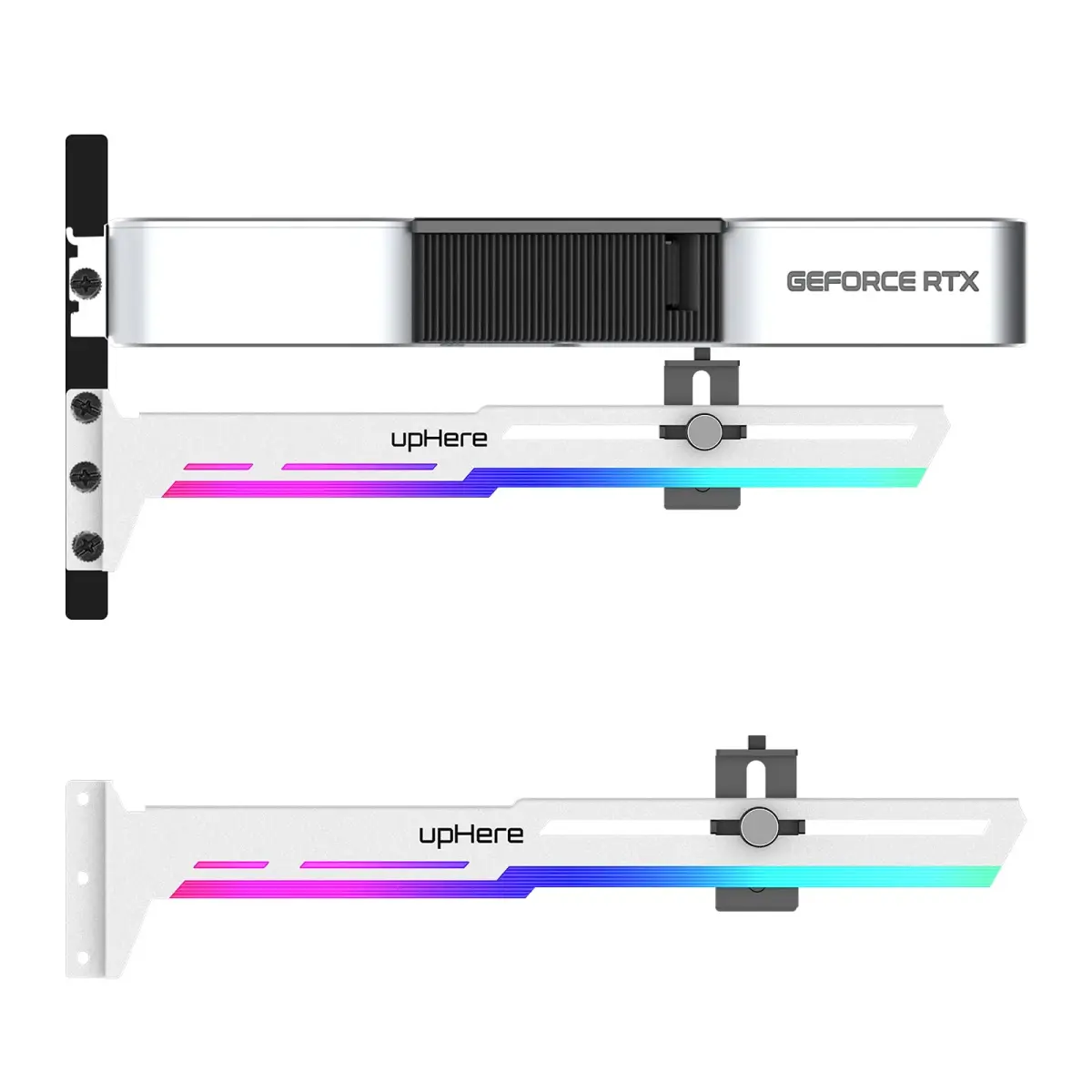
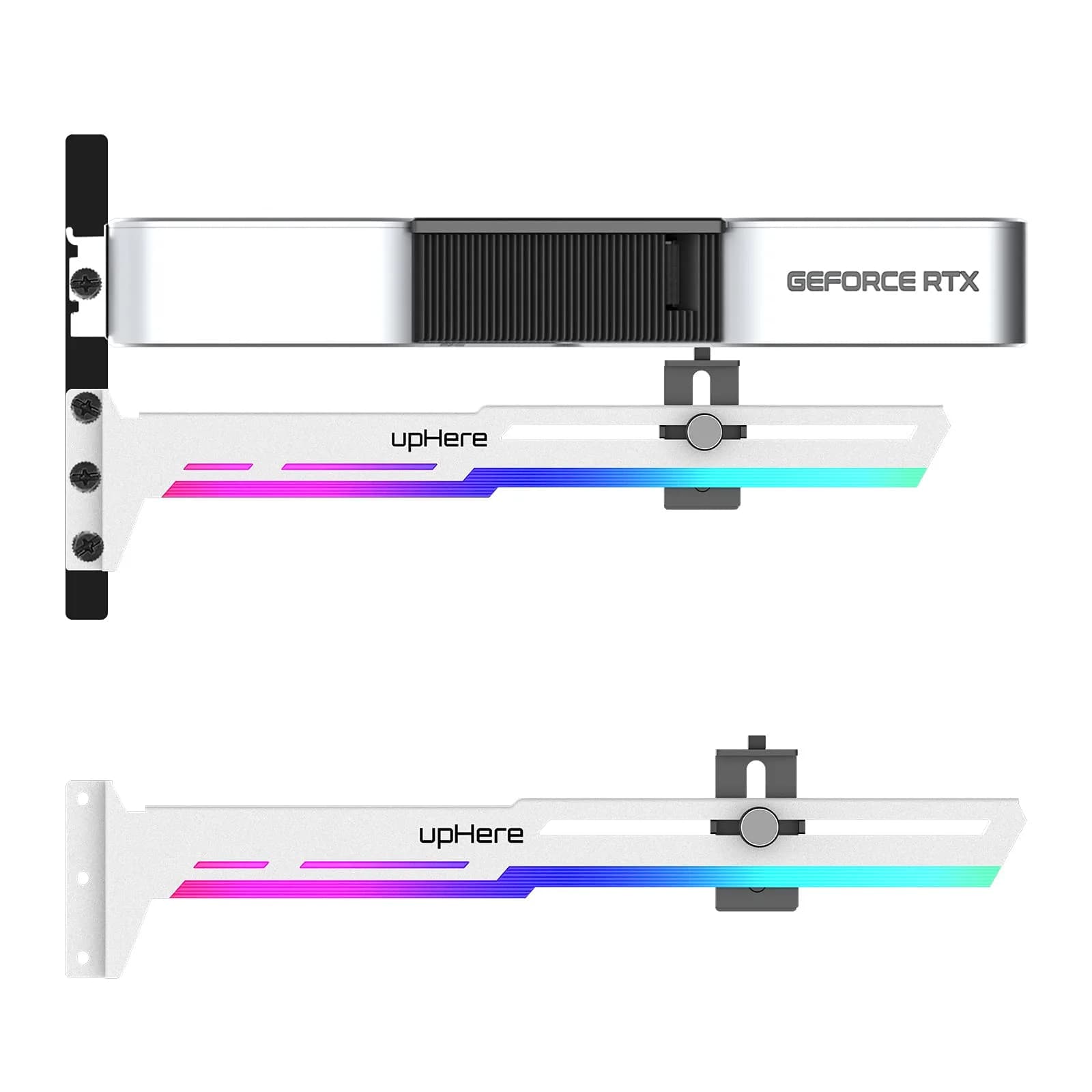
# upHere 5V Addressable RGB White Graphics Card GPU Brace Support Video Card Sag Holder with ARGB Strip, Adjustable Length and Height Support (1-Pack)

**Brand:** upHere
**SKU:** fqn6110
**ASIN:** B091TP4MPV
**Canonical URL:** https://crowcrowcrow.com/p/uphere-addressable-rgb-white-graphics-card-gpu-brace-support-video-sag-holder-built-in/fqn6110
**Category:** electronics
**Subcategory:** Categories
**Availability:** in_stock
**Price (INR, all-inclusive):** ₹2,316
**Discount:** 32%
**Customer rating:** 4.50/5 from 611 ratings

## Description

upHere G276WTARGB GPU Brace prevents graphics card sag with adjustable support and 5V ARGB lighting. Built with sturdy iron, it syncs with motherboards for customizable PC aesthetics. Essential for PC builders in India seeking to protect their GPUs and enhance build visuals. {{ccc_delivery_eta}} delivery.

## Highlights

- Prevents GPU Sag — Sturdy iron structure prevents graphics cards from bending and sagging, extending their lifespan and maintaining performance. Essential for heavy, long cards.
- Customizable ARGB Lighting — Built-in 5V ARGB strip syncs with your motherboard for vibrant, customizable PC case lighting. Connect only to 5V 3PIN ARGB headers to avoid damage.
- Adjustable Support System — Slide-type support structure allows for 2-way adjustment in length and height, ensuring compatibility with various graphics card sizes and PC case layouts.
- Easy Installation & Compatibility — Designed for simple and convenient adjustment, fitting a wide range of motherboards and cases. Protects your GPU without complex setup.

## Key features

- 01.Simple and Convenient adjustment method,has a slide type support structure.
- 02.Use sturdy iron as the main structure to provide strong support.Prevents GPUs from bending and sagging after long period of use.
- 03.Adaptable to a wide range of motherboards and cases,provides 2-way adjustment,which can be adjusted for different lengths of Graphic cards and support positions.
- 04.Synchronizable ARGB lighting via motherboard: Built with the advanced ARGB lighting system,support 5V 3PIN ARGB motherboard synchronization, multiple rgb modes can be switched,makes your computer case colorful.* *Please never connect it to 4pin 12V RGB_HEADER.Otherwise you will destroy the entire led strip.
- 05.What You Get: G276WTARGB GPU Holder,our worry-free 12-month warranty and friendly customer service.

## Why choose this product

- The upHere G276WTARGB GPU Brace is specifically engineered to address the common issue of graphics card sag. Its robust iron construction provides unwavering support, while the adjustable slide mechanism ensures a perfect fit for diverse GPU lengths and PC case configurations. The integrated 5V ARGB lighting system adds a dynamic visual flair, synchronizing with your motherboard to create a personalized gaming aesthetic. This brace is more than just support; it's a component that enhances both the longevity and the visual appeal of your high-performance PC build, ensuring your graphics card remains protected and looks stunning. — Engineered for PC Builders
- This GPU brace is ideal for PC builders in India who have installed or plan to install large, heavy graphics cards that may bend over time. It's perfect for those looking to add customizable ARGB lighting to their build and ensure their GPU is securely supported. Skip this if your graphics card is very small and lightweight, or if your PC case has extremely limited internal space that cannot accommodate an adjustable support bracket. Also, ensure your motherboard has a compatible 5V 3PIN ARGB header for the lighting feature. — Who It's For & Who Should Skip

## How to use

1. Position the upHere GPU Brace inside your PC case. Adjust its length and height using the slide-type mechanism to align with your graphics card's underside. — Mount the Brace
2. Ensure the brace is firmly in place, providing stable support to the graphics card to prevent any bending or sagging. Verify it fits snugly against the card's frame. — Secure the Support
3. Connect the 5V ARGB strip's connector to a compatible 5V 3PIN ARGB header on your motherboard. Double-check compatibility to avoid damaging the LEDs. — Connect ARGB Lighting
4. Turn on your PC. Your motherboard's RGB software should now detect the ARGB strip, allowing you to customize lighting effects and synchronize them with other components. — Power On and Sync

## Product details

| Field | Value |
|---|---|
| Recommended Use | Gaming, PC Building, GPU Support |
| Adjustment Method | Slide-type support structure, 2-way adjustment (length & height) |
| Lighting Connector | 5V 3PIN ARGB Motherboard Synchronization (DO NOT connect to 4pin 12V RGB_HEADER) |
| Power Requirement | Requires 5V ARGB header from motherboard |
| Brand | upHere |
| Model Name | G276WTARGB |
| Color | White ARGB |
| Material | Iron Structure, Plastic ARGB Strip |
| Dimensions (L x H x W) | 28.7 cm x 7.3 cm x 3.1 cm (11.3 in x 2.9 in x 1.2 in) |
| Item Package Weight | 0.2 kg (0.44 lb) |
| Compatible Devices | Desktop PCs |
| Graphics Card Interface | PCIe |
| Graphics Coprocessor | NVIDIA |
| Graphics Description | Graphics Card |
| Country of Origin | Not stated by manufacturer — US retail version, sourced from authorized US retailers |

## Frequently asked questions

### How do I install the upHere GPU Brace?

The upHere GPU Brace features a simple slide-type adjustment method. Mount the bracket within your PC case, adjust its length and height to support your graphics card, and connect the 5V ARGB strip to your motherboard's 5V 3PIN ARGB header. Ensure it's securely in place to prevent GPU sag.

### Will this GPU brace fit my graphics card and PC case?

Yes, the upHere GPU brace is designed with 2-way adjustment for length and height, making it adaptable to a wide range of graphics card sizes and PC cases. Its slide-type support structure allows for flexible positioning to ensure a secure fit for most standard ATX and larger builds.

### Can I connect the ARGB lighting to any RGB header?

No, you must connect the ARGB lighting strip ONLY to a 5V 3PIN ARGB motherboard header. Connecting it to a 4pin 12V RGB_HEADER will permanently damage the LED strip. Always verify your motherboard's header type before connecting.

### How to choose a video card for my PC?

Choosing a video card depends on your PC's intended use, such as gaming or professional applications. Consider your budget, desired resolution and frame rates, and the power supply wattage available. Ensure your motherboard has a compatible PCIe slot and your case has sufficient space for the card's dimensions.

### What is the best video card?

The 'best' video card depends on your specific needs and budget. High-end cards like NVIDIA GeForce RTX series or AMD Radeon RX series offer top performance for demanding games and tasks. For budget-conscious users, mid-range options provide excellent value. Always check benchmarks for the games or applications you intend to use.

### Is this GPU brace healthy for my graphics card?

Yes, this GPU brace is designed to be healthy for your graphics card by preventing physical stress from sagging. By providing stable support, it helps maintain the integrity of the GPU's internal components and connections, potentially extending its lifespan and preventing performance issues caused by physical strain.

### Are video cards safe?

Modern video cards are generally safe when installed and used correctly within a properly functioning PC system. Ensure adequate cooling, a stable power supply, and correct driver installations. This GPU brace further enhances safety by preventing physical sag, which can stress components.

### How to use a video card?

To use a video card, install it into a compatible PCIe slot on your motherboard, connect the necessary power cables from your power supply, and connect your monitor to the card's output ports. Install the latest drivers from the manufacturer's website for optimal performance and compatibility.

### Can I use this GPU brace daily?

Yes, this GPU brace is designed for continuous daily use to provide constant support for your graphics card. Its sturdy construction and adjustable mechanism are built to withstand long-term operation, helping to prevent GPU sag and maintain system stability.

### What are the benefits of a video card?

Video cards (GPUs) are essential for rendering images, video, and animations on your display. They significantly accelerate graphics-intensive tasks like gaming, video editing, 3D rendering, and AI computations, providing a smoother and more visually rich experience compared to integrated graphics.

## Compliance

Electrical component. Ensure compatibility with motherboard's 5V 3PIN ARGB header. Incorrect connection to 12V headers will damage LEDs. Installation by a qualified PC builder is recommended.

## Images

1. https://images.crowcrowcrow.com/B091TP4MPV-2.webp
2. https://images.crowcrowcrow.com/B091TP4MPV-5.webp
3. https://images.crowcrowcrow.com/B091TP4MPV-8.webp
4. https://images.crowcrowcrow.com/B091TP4MPV-11.webp
5. https://images.crowcrowcrow.com/B091TP4MPV-14.webp
6. https://images.crowcrowcrow.com/B091TP4MPV-17.webp

---

Source: https://crowcrowcrow.com/p/uphere-addressable-rgb-white-graphics-card-gpu-brace-support-video-sag-holder-built-in/fqn6110

Returns: 30 days, free, by mail. Shipping: Free across India, 7–13 business days. Prices are all-inclusive (duties + GST).